Tax Deducted at Source (TDS) plays a vital role in India's direct tax framework, ensuring revenue is collected systematically at the source of income. For businesses, employers, deductors, and individual taxpayers, timely TDS deduction and prompt deposit with the government are legal mandates under the Income Tax Act.
Once the tax deposit is completed, obtaining and preserving the TDS Paid Challan is essential. This challan serves as statutory legal proof of tax payment, enables deductors to accurately quote BSR codes and Challan Identification Numbers (CIN) while filing quarterly TDS returns (Form 24Q, 26Q, 27Q), and ensures tax credits reflect seamlessly in the deductee's Form 26AS and Annual Information Statement (AIS).
If you need to download your paid TDS challan receipt or verify the online challan status using your CRN (Challan Reference Number) or TAN/PAN, this comprehensive guide covers every step on the official Income Tax e-filing portal and the TIN-NSDL OLTAS tracking system.
You can download your TDS payment challan directly from the Income Tax e-Filing portal under e-File > e-Pay Tax > Payment History, or track status using your 14-digit CRN or 7-digit BSR Code + Challan Serial Number.
What is a TDS Challan?
A TDS Challan is an official tax deposit receipt generated when tax deducted or collected at source (TDS/TCS) is remitted to the Central Government through authorized banking channels or the Income Tax e-filing payment gateway.
Introduced in its modern digital form through the Online Tax Accounting System (OLTAS), the digital challan replaced physical paper foils, drastically minimizing clerical errors and streamlining tax accounting.
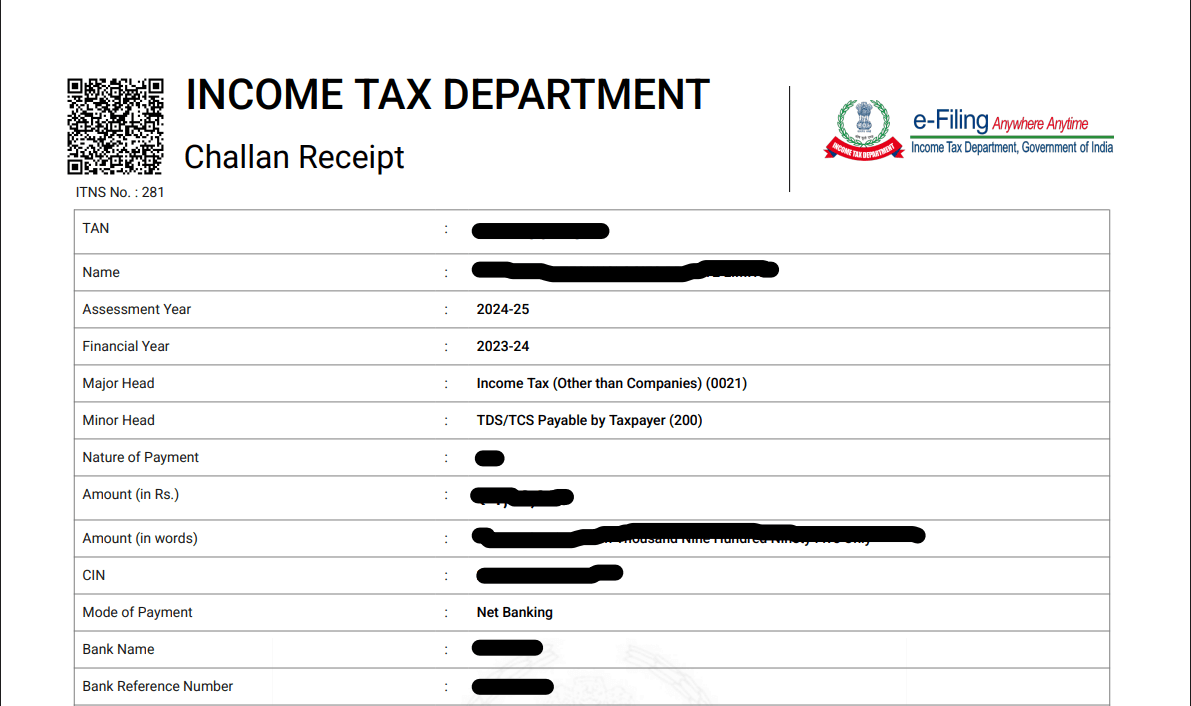
Every valid TDS paid challan contains critical identification data points:
- TAN (Tax Deduction and Collection Account Number) or PAN of the deductor.
- Name and address of the deductor/taxpayer.
- Assessment Year (AY) and Financial Year (FY) for which tax is paid.
- Minor Head & Major Head Code (e.g., Company Deductee - 0020, Non-Company Deductee - 0021).
- Type of Payment Code (e.g., 200 for TDS payable by taxpayer, 400 for regular assessment).
- Challan Identification Number (CIN), which comprises the 7-digit BSR Code, the Challan Tender Date, and the Challan Serial Number.
- Challan Reference Number (CRN) generated by the Income Tax e-filing system.
Types of Income Tax Challans and Their Uses
The Income Tax Department provides dedicated challans depending on the nature of direct tax being remitted. Understanding each challan type ensures you deposit tax under the correct category and avoid receiving defective return notices:
| Challan Number | Name & Primary Purpose | Who Uses It |
|---|---|---|
| ITNS 281 | TDS / TCS Deposit — Used for depositing tax deducted at source or tax collected at source on salaries, contracts, rent, commission, etc. | Corporates, firms, employers, deductors with a TAN |
| ITNS 280 | Income Tax Payment — Covers Advance Tax, Self-Assessment Tax, Regular Assessment Tax, and Tax on Distributed Income. | Individual taxpayers, HUFs, companies depositing their own income tax |
| ITNS 282 | Other Direct Taxes — Used for payments related to Securities Transaction Tax (STT), Gift Tax, Wealth Tax, and Estate Duty. | Entities & investors subject to specific direct tax provisions |
| ITNS 283 | Banking & Fringe Taxes — Single-copy challan for Fringe Benefit Tax (FBT) and Banking Cash Transaction Tax (BCTT). | Employers and commercial entities |
| ITNS 286 | Income Declaration Scheme — Applicable for undisclosed income disclosures under past compliance windows. | Disclosing taxpayers |
| ITNS 287 | PM Garib Kalyan Yojana (PMGKY) — Designated for depositing taxes, penalties, and surcharges under PMGKY. | Eligible declarants |
If you are depositing TDS on salaries (Section 192), contractor payments (194C), professional fees (194J), or rent (194I), always select Challan ITNS 281.
Requirements for Downloading TDS Challans Online
Before heading to the Income Tax portal, keep the following credentials and payment records ready:
- Login Credentials: Your valid User ID (TAN for deductors or PAN for individuals) and e-filing portal password.
- PAN / TAN Details: The exact 10-digit alphanumeric TAN or PAN under which the tax payment was initiated.
- Challan Reference Details: The 14-digit CRN (Challan Reference Number) received upon payment creation, or the date range and payment mode (Net Banking, UPI, Debit Card, RTGS/NEFT).
- Assessment Year: The corresponding Assessment Year (e.g., AY 2026-27 for FY 2025-26).
How to Download TDS Paid Challan from Income Tax Portal
Follow these steps to view and download your TDS payment challan receipt from the Income Tax e-Filing portal:
Step 1: Log in to the Income Tax e-Filing Portal
Open your web browser and navigate to the official Income Tax e-Filing Portal. Click on Login at the top right, enter your TAN / PAN as the User ID, verify your secure access image, and input your password.
Step 2: Navigate to "e-Pay Tax"
Once logged into your dashboard, go to the top navigation bar. Click on the e-File menu, hover over e-Pay Tax, and click it to open the tax payment management module.
Step 3: Access the "Payment History" Tab
On the e-Pay Tax screen, you will see three tabs: Saved Drafts, Generated Challans, and Payment History. Click on Payment History to view all successfully processed and cleared challans.
Step 4: Filter by Date Range or Assessment Year
Locate the filter bar on the right side of the screen. Select the relevant Financial Year or specify a custom Date Range to quickly narrow down the list of transactions.
Step 5: Download the Challan PDF Receipt
Find the required transaction row. Under the Action column on the far right, click the three vertical dots (kebab menu) and select Download. Your official TDS Paid Challan receipt will immediately download in PDF format.
Download the Challan Receipt via CRN Number
Every time a challan is created on the e-filing portal, the system generates a unique 14-digit Challan Reference Number (CRN). If you have your CRN handy, you can locate and download the receipt with zero hassle:
- Visit the Income Tax e-Filing Portal and log in with your credentials.
- Navigate to e-File > e-Pay Tax.
- Under either the Generated Challans tab (for active or recently cleared payments) or the Payment History tab, search for your 14-digit CRN.
- Click on View Details next to the matching CRN to inspect payment breakdown (Tax, Surcharge, Cess, Interest, Fee).
- Click Download at the bottom of the details drawer to save the PDF challan bearing the authorized bank confirmation and CIN.
How to Check Challan Status Online via OLTAS (TIN-NSDL)
In addition to the e-Filing dashboard, you can independently verify whether your tax payment has reached the government treasury through the TIN-NSDL (Protean) Challan Status Inquiry portal:
1. CIN-Based View (Challan Identification Number)
If you have your paid challan receipt, you can verify its realization status:
- Go to the official TIN-NSDL Challan Status Inquiry webpage (
tin-nsdl.com). - Select CIN Based View.
- Enter the BSR Code of the collecting branch (7 digits).
- Enter the Challan Tender Date (DD/MM/YYYY).
- Enter the Challan Serial Number (up to 5 digits).
- Optional: Enter the total amount for exact matching.
- Enter the captcha and click View Status. The system will verify if the bank has uploaded the challan to the tax database.
2. TAN-Based View (For Deductors)
Deductors filing quarterly returns can verify all challans deposited within a specific period:
- Select TAN Based View on the TIN-NSDL inquiry page.
- Enter your 10-digit TAN and select the payment period (up to a 24-month span).
- Click View Challan Details to review all linked CINs, payment amounts, and realization dates.
- Deductors can also download the Challan File (
.csifile) required for validating quarterly TDS returns in RPU/FVU software.
Key Elements to Check on Downloaded TDS Challan
Before archiving or quoting your challan in tax filings, always cross-verify these crucial details on the downloaded receipt:
- Challan Identification Number (CIN): Consisting of BSR Code + Tender Date + Serial Number. You need this exact sequence while filling quarterly TDS return forms.
- Major & Minor Head: Verify that the payment falls under the correct Minor Head (e.g., Code
200for regular monthly TDS deduction, Code400for tax paid under demand). - Section Code: Ensure the correct TDS section (e.g., 194C, 194J, 192) was selected.
- Deductor TAN & Legal Name: Confirm the spelling matches your official registration to prevent credit misallocation.
Troubleshooting Common TDS Challan Issues
If money was deducted from your bank account via Net Banking or UPI but the status still reflects Pending or is missing from Payment History:
- Do not initiate an immediate double payment.
- Wait 24 to 48 banking hours for the bank payment gateway to reconcile with RBI and the income tax server.
- Check Generated Challans tab, locate the CRN, and click Check Payment Status to trigger instant gateway reconciliation.
How to Rectify Errors in a Deposited Challan
If you accidentally entered the wrong Assessment Year, Minor Head, or TAN:
- Online Challan Correction: Deductors and taxpayers can request challan corrections directly on the e-filing portal under Services > Challan Correction.
- Bank Branch Correction: For physical payments over the counter, corrections in minor heads or amounts can be requested at the respective collecting bank branch within 7 to 30 days of payment.